Kami
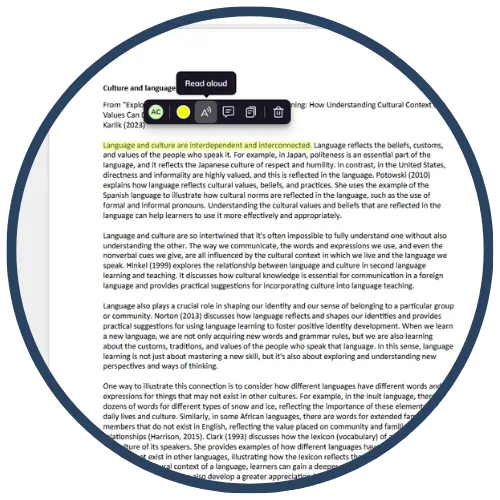
Kami is a web-based annotation and markup tool that allows students and teachers to read, write on, highlight, annotate, and collaborate on PDFs, images, worksheets, and documents. It supports blended and digital learning by offering drawing tools, text boxes, audio/video comments, shapes, equations, and real‑time collaboration—making it ideal for interactive assignments, feedback, and accessible learning. Kami integrates seamlessly with Google Classroom, Schoology, Canvas, and other LMS platforms.
Tech Level

Intermediate
Grade Bands
2-12
Explore the Tool
Getting Started
Go to https://web.kamihq.com and create a free account using your school email.
Install the Chrome extension for easier access on Google Classroom or Drive.
Open a PDF, image, or document to begin annotating with the toolbar.
Key Classroom Features
Annotation Tools: Highlighting, markup, drawing, text boxes, shapes, equations, and comments.
Audio/Video Feedback: Teachers and students can record feedback or explanations directly on the document.
Collaboration: Multiple users can annotate the same document in real time.
LMS Integration: Works with Google Classroom to assign, turn in, and grade interactive PDFs.
Share via URL: Students and teachers can easily share work online.
AVID Strategy Connections
✏️ Writing
Digital Writing Tasks: Students respond to prompts directly on PDFs using text boxes.
Audio/Video Reflection: Students record reflections or written explanations orally for deeper processing.
💡 Inquiry
Question Annotation: Students annotate questions in the margins to track confusion and curiosity.
Evidence Highlighting: Learners identify claim‑evidence‑reasoning components with color‑coded highlights.
💬 Collaboration
Shared Annotation: Students co‑annotate documents, discuss notes, or review each other’s drafts.
Peer Feedback: Use comment tools for structured feedback cycles.
🗂️ Organization
Digital Notebooking: Students maintain organized PDF notebooks with tabs, highlights, and color coding.
Scaffolded Worksheets: Teachers embed instructions, examples, and modeling using markup tools.
📖 Reading
Close Reading: Students use highlighting, margin notes, and text comments to annotate texts.
Accessible Reading: Use read‑aloud tools (in premium), zoom tools, and visual cues to support comprehension.
Accessibility Spotlight
Kami enhances accessibility through multimodal annotation tools, allowing students to respond using text, drawing, audio, or video. This flexibility supports multilingual learners, students with dyslexia, and those who benefit from varied expression formats. Teachers can scaffold complex materials by embedding instructions, highlighting key information, and using visual cues. Real‑time collaboration and shareable links also support students who need additional time, guided practice, or alternative access paths.

