Visla
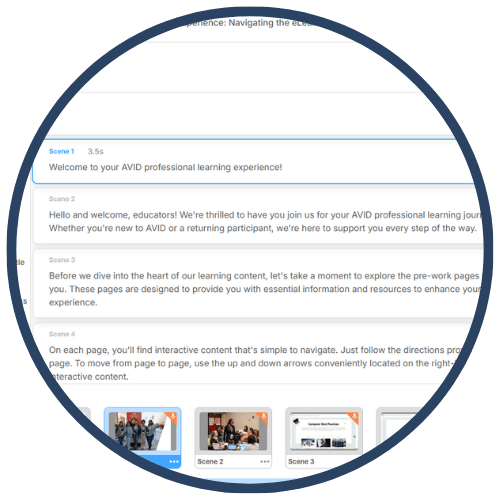
Visla is an AI‑powered video creation platform that enables teachers, students, and school leaders to quickly create professional‑quality educational videos. Using prompt‑based creation, screen recording, and text‑based editing, Visla transforms scripts, slide decks, or URLs into narrated videos with visuals, subtitles, and music. In education, Visla supports flipped instruction, student presentations, tutorials, portfolios, and school communications while reducing technical barriers to video production.
Tech Level

Intermediate
Grade Bands
6–12
Explore the Tool
Getting Started
Go to https://www.visla.us/ and create an educator or student account.
Choose how you want to create a video: prompt, script, URL, screen recording, or PowerPoint upload.
Review the AI‑generated video and edit using Visla’s text‑based editor.
Export or share the final video for class use or assessment.
Key Classroom Features
Prompt‑Based Video Creation: Enter a topic, script, or URL, and Visla generates a complete video with visuals, captions, and music.
PowerPoint to Video: Convert slide decks into narrated instructional videos.
AI Step Recorder: Record screen and webcam actions; Visla automatically numbers steps for tutorials and walkthroughs.
Text‑Based Editing: Edit videos by editing the transcript—deleting text removes the matching video segment.
Voiceover Options: Record your own narration or use AI‑generated voices.
AVID Strategy Connections
✏️ Writing
Script Writing: Students draft scripts or outlines before generating videos, strengthening organization and clarity.
Revision & Editing: Text‑based editing supports revision skills similar to those used in document editing.
💡 Inquiry
Explain‑Your‑Thinking Videos: Students create videos explaining processes, reasoning, or conclusions.
Concept Clarification: Teachers generate short explainer videos to address misconceptions.
💬 Collaboration
Group Video Projects: Teams divide roles (script writer, editor, presenter) and co‑create a video.
Peer Feedback: Students review videos and provide structured feedback on clarity and evidence.
🗂️ Organization
Step‑by‑Step Tutorials: An AI step recorder helps students and teachers organize procedures clearly.
Project Planning: Videos follow a logical flow (introduction → explanation → summary).
📖 Reading
Multimodal Comprehension: Students read scripts, subtitles, and visuals together to build understanding.
Summarization: Students convert readings or research into concise video explanations.
Accessibility Spotlight
Visla supports inclusive learning by offering captions, visual storytelling, and audio narration, giving students multiple ways to access and express understanding. Text‑based editing lowers barriers for students who struggle with traditional video timelines, while AI‑generated visuals and voiceovers support multilingual learners and students with processing needs. Short, chunked videos also help reduce cognitive load while maintaining rigorous expectations.