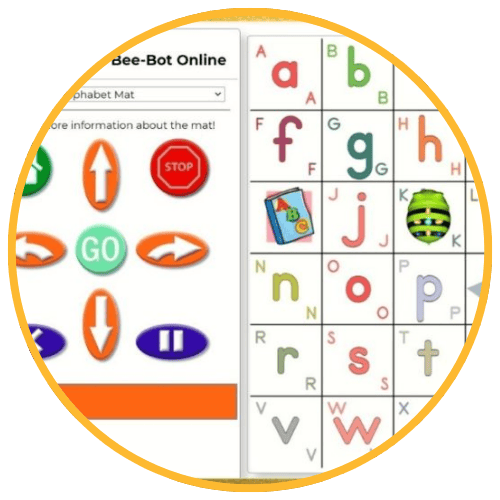
Bee‑Bot Online
The Bee‑Bot Online Emulator is a virtual version of the popular Bee‑Bot floor robot, designed to help young learners practice sequencing, directional language, basic coding, and problem‑solving skills. Students program the on‑screen Bee‑Bot using forward, backward, left, and right commands to navigate themed mats, reinforcing computational thinking through play‑based learning.
Tech Level

Beginner to Intermediate
Grade Bands
PreK–2
Explore the Tool
Visit the Bee‑Bot Online simulator: https://beebot.terrapinlogo.com/
Select a mat (e.g., alphabet, shapes, treasure map, CVC words).
Use the directional buttons to program the Bee‑Bot with a sequence of commands.
Press “Go” to execute the sequence and adjust as needed.
- Virtual Mats: Themed mats for literacy, numeracy, geography, and sequencing.
- Programmable Sequencing: Students chain commands to navigate the mat.
- No Account Required: Quick classroom access; perfect for centers or whole‑group modeling.
AVID Strategy Connections
✏️ Writing
- Sequence Stories: Students write the steps they programmed into Bee‑Bot using first/next/then language.
- Labeling: Students label mat spaces or create written prompts for Bee‑Bot challenges.
💡 Inquiry
- Prediction Prompts: Students predict where Bee‑Bot will land before running their code.
- Debugging Questions: Learners analyze mistakes, ask “Why didn’t Bee‑Bot end up where we expected?” and revise.
💬 Collaboration
- Pair Programming: Students take turns as “coder” and “checker” while developing sequences.
- Team Challenges: Groups work together to solve navigation tasks on themed mats.
🗂️ Organization
- Step Cards: Students organize directional cards to plan their sequence before programming.
- Visual Path Mapping: Learners map the route on paper before inputting commands.
📖 Reading
- Directional Vocabulary: Students read and use words like forward, turn, left, right, start, and finish.
- Mat-Based Literacy: Themed mats (letters, CVC words, story mats) reinforce phonics and vocabulary through movement.
Accessibility Spotlight
Bee‑Bot Online supports inclusive classrooms through visual, hands‑on, and play‑based learning experiences that help young learners grasp sequencing and problem‑solving concepts. The simple button interface, predictable movement, and colorful mats provide strong visual cues for multilingual learners, emerging readers, and students who benefit from structured, concrete representations. For example, tasks can be broken into small steps and immediately tested. Bee‑Bot Online supports students who need repetition, guided practice, or alternative entry points to early computational thinking.

